 Acer File Extensions |
Acer V55LA-N2 Motherboard
Jumper and Connector Layout
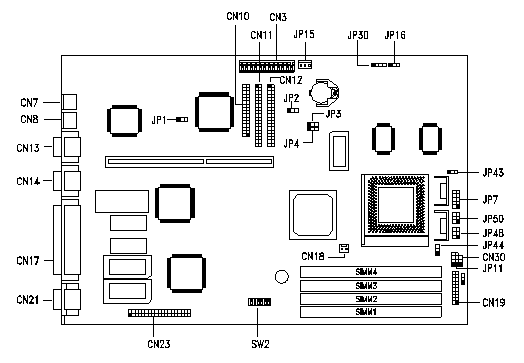
Note - The blackened pin of a jumper represents pin 1.
Specification
The V55LA-N system has the following features -
- A zero-insertion force (ZIF) socket for an Intel Pentium 75/90/100/120/133/150/166/200 MHz
- Two DRAM banks composed of four 72-pin SIMM sockets that support 4/8/16/32-MB 60-/70ns fast-page or EDO-type SIMMs
- 256/512-KB write-back synchronous pipeline-burst second-level cache onboard
- 128-KB APM-compliant system and VGA BIOS
- Two PCI-enhanced IDE interfaces that support up to four IDE devices in PIO mode 4 and DMA mode 2
- System clock/calendar with 128 bytes CMOS RAM
- Standard 1-MB video DRAM onboard plus two upgrade sockets for up to 2-MB video memory
- 188-pin connector for PCI/ISA slot board
- External ports:
- PS/2 keyboard and mouse ports
- Two buffered high-speed serial ports (NS16C550-compatible UARTs with 16-byte FIFOs
- One ECP/EPP high-speed parallel port (IEEE 1284-compliant)
- Video port
- Onboard controller chipsets
- System chipsets (ALI M1521, ALI M1523)
- PCI local bus VGA with enhanced GUI acceleration (ATI 264VT / ATI 264GT RAGE II+)
- Internal IDE (ALI 1523B)
- System and PCI clock generator (Cypress 2254)
- Plug-and-Play feature (PnP)
- Power management features (device standby, global standby, and suspend modes)
- Software Shutdown feature "Appears Off" (for Windows 95) is now integrated on the motherboard. A Software Shutdown power supply is required to use this feature. (Not all V55LA-N-II systems shipped with a Software Shutdown power supply).
CPU Jumper Settings
SW2 Settings
| CPU Freq. | 1 | 2 | 3 | 4 |
|---|---|---|---|---|
| Intel 75 MHz | ON | ON | OFF | OFF |
| Intel 90 MHz | ON | OFF | OFF | OFF |
| Intel 100 MHz | OFF | ON | OFF | OFF |
| Intel 120 MHz | ON | OFF | ON | OFF |
| Intel 133 MHz | OFF | ON | ON | OFF |
| Intel 150 MHz | ON | OFF | ON | ON |
| Intel 166 MHz | OFF | ON | ON | ON |
| Intel 200MHz | OFF | ON | OFF | ON |
| Cyrix/IBM 6x86 P120+ | ON | ON | ON | OFF |
| Cyrix/IBM 6x86 P150+ | ON | OFF | ON | OFF |
| Cyrix/IBM 6x86 P166+ | OFF | ON | ON | OFF |
Notes -
- For non-MMX Intel processors and Cyrix M1 (6X66) processors, set JP7 Closed, JP43 to 2-3, and JP44 to 2-3.
- For MMX Intel processors and Cyrix M1 (6X66L) processors, set JP7 Open, JP43 to 2-3, and JP44 to 2-3.
| Switch | Setting | Function |
|---|---|---|
| CPU Clock Frequency Switches 1, 2 | ON, ON ON, OFF OFF, ON | 75/50 MHz 90/60, 120/60, 150/60 MHz 100/66, 133/66, 166/66, 200/66 MHz |
| CPU Frequency Ratio Switches 3, 4 | ON, ON OFF, OFF ON, OFF OFF, ON | Intel M1 K5 5/2 1/1 2/1 3/2 3/1 3/2 2/1 2/1 - 3/1 4/1 - |
| Switch 5 | ON OFF | Reserved Reserved |
| Password Security Switch 6 | ON OFF | Password bypass Password check |
Jumper Settings
| Jumper | Setting | Function |
|---|---|---|
| JP1 BIOS Type | 1-2 | For models with Acer BIOS For models with OEM BIOS |
| JP2 LED Function | 1-2 2-3 | LED for IDE and FDD LED for IDE only |
| JP3, JP4 Second-level Cache | 1-2, 1-2 2-3, 2-3 | 256 KB 512 KB |
| JP7 Regulator | Closed Open | For single-voltage CPUs (P54C, K5, M1) For dual-voltage CPUs (P55C, K6) |
| JP11 SMM/Reset Switch | 1-2 2-3 | Supports SMM switch Reserved |
| JP16 Software Shutdown | 1-2 2-3 | UPS enabled UPS disabled |
| CPU Voltage JP43 (for I/O) JP44 (for core) | 1-2 2-3 1-2 2-3 | 3.5V 3.3V 2.5V 2.8V |
Connector Functions
| Connector | Function |
|---|---|
| CN3 | Power connector |
| CN7 | PS/2 keyboard connector |
| CN8 | PS/2 mouse connector |
| CN10 | Diskette drive connector |
| CN11 | IDE connector 2 |
| CN12 | IDE connector 1 |
| CN13 | Serial port 1 |
| CN14 | Serial port 2 |
| CN17 | Parallel port |
| CN18 | CPU fan connector |
| CN19 | Multifunction connector |
| CN21 | Video port |
| CN23 | ATI multimedia connector (AMC) |
| JP15 | Standby power connector |
| JP30 | External battery connector |
| JP48 | Hard disk and message LED (pins 1-3-5) Power LED (pins 2-4-6) |
| JP50 | Power-on switch connector |
Memory
The system board comes with four 72-pin SIMM sockets that support 4-MB and 16-MB single-density 60/70ns SIMMs and 8-MB and 32-MB double-density 60/70ns SIMMs. These systems ship with either Extended Data Output (EDO) or Fast Page Mode (FPM) 60/70ns memory. DO NOT MIX FPM and EDO SIMMS. Maximum is 128MB.
Video RAM Upgrade
Aspire Personal Solutions and SOHO systems ship with 1 MB EDO memory onboard and are upgradeable to 2 MB EDO. Aspire Ultimate systems are standard with the maximum 2 MB EDO memory. Order the video upgrade kit from Acer Access P/N 91.AA994.001.
Cache Upgrade
The system ships with either 256k (Personal Solution Systems) or 512k (Ultimate Multimedia Systems) Pipeline Burst Cache soldered to the motherboard and is not upgradeable.