 Acer File Extensions |
Acer V6 Motherboard
Jumper and Connector Layout
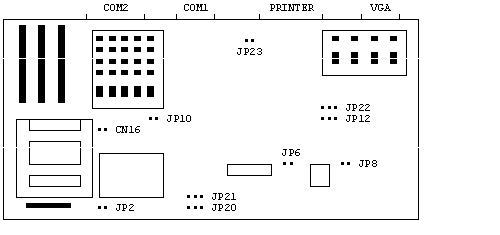
Jumper Settings
| Jumper | Setting | Function |
|---|---|---|
| JP2 | 1-2 | Check Password |
| 2-3* | Bypass Password | |
| JP3 | 1-2* | Enable Reset Button |
| 2-3 | Disable Reset Button | |
| JP6 | Open | Discharge the Real-Time Clock |
| Close* | Normal Operation | |
| JP8 | ON | I/O Address From 140H (for Onboard SCSI) |
| OFF | I/O Address From 340H (for Onboard SCSI) | |
| JP10 | Open* | Enable Onboard 4MB Memory |
| Close | Disable Onboard 4MB Memory | |
| JP12 | 1-2* | Enable Onboard VGA |
| 2-3 | Disable Onboard VGA | |
| JP22 | 1-2 | Select IRQ 10 (For Onboard SCSI) |
| 2-3 | Select IRQ 11 (For Onboard SCSI) | |
| JP23 | ON* | Enable Onboard FDD,HDD,COM1,COM2 and PRN |
| OFF | Disable Onboard FDD,HDD,COM1,COM2 and PRN | |
| JP41 | CLOSE | Enable CMOS Battery |
| OPEN | Disable CMOS Battery | |
| JP20 | 1-2 | 20/25/33 MHz Speed |
| 2-3 | 40/50 MHz Speed | |
| CN16 | 1-4 | 20/40 MHz Speed |
| 2-5 | 25/50 MHz Speed | |
| 3-6 | 33 MHz Speed |
* Default
Upgrade Math-Coprocessor
The V6 System 486Sx/25MHz has no socket for the math coprocessor. To get the math coprocessor option feature, one must upgrade to the 486DX/33MHz or higher CPU.
Memory
Use 1MB, 4MB, or 16MB 72-Pin SIMMs. 80NS speed, fast page mode. Maximum 64MB RAM.
P10 = OFF: Disables onboard 4MB Memory.
Bank 0 & 1 must have the same size memory SIMM installed. Bank 2 & 3 must have the same size memory SIMM installed
Video Memory
The onboard VGA RAM can be upgraded from 512K to 1 MB. Order P/N 91.00023.901 "512K to 1MB Upgrade" from Acer Access. This kit contains four 256K*4,80NS DRAM chips.
Cache
The system supports second-level cache upgrade sizes of 64K, 128K, and 256K.