 Acer File Extensions |
Advent 5480 DVD Laptop
Specification
| CPU | Intel Pentium III 800MHz |
| Memory | 128MB PC133 SDRAM SODIMM (2 memory slots. Max 512MB) |
| Hard Drive | 10GB Hitachi DK23BA-10 |
| CD Drive | QSI DVD-ROM SDR-081 |
| Floppy Drive | Floppy disk drive fitted |
| Screen | 14.1" TFT (Native Res.1024x768) |
| Video Card | SiS 630 8MB shared |
| Sound Card | SiS 7018 |
| Modem | SmartLink 56K - HAMR 5600 V.90 |
| Network Card | SiS 900 |
| PC Card | Will take either 2x Type I/II or 1x Type III |
| Ports | 1x IR 1x Kensington Lock 1x USB 1.1 1x Modem 1x PS/2 1x Microphone 1x Headphone 1x VGA 1x Serial 1x Parallel 1x LAN |
| Made By | Gericom 340S2 |
Drivers
Your laptop should have been supplied with a "Utility and Driver CD" which contains a backup copy of all the drivers.
Upgrading the Memory
Many thanks to Tom Evans for the additional notes on how to remove the keyboard.
1. Ensure that the power is off, the unit is unplugged and the battery is removed.
2. Remove the keyboard by lifting the 3 small clips at the front of the keyboard with a small screwdriver. *
3. Lift the keyboard clear of the notebook, there is a ribbon cable attached to the keyboard so take care.
4. Now lift the metal keyboard protector from the case.
5. You now need to remove the metal cover in the middle of the case.
6. You now have access to the 2 memory slots.
* These consist of one located at approximately 2 cm from each end of the keyboard, and one additional one located in an odd, off centre position. This central one is the most difficult to find, as it lies approximately 1.5cm to the right of the right edge of the mouse pad... directly below he scroll lock indicator (but on the front of the keyboard). NOTE: You may also encounter a difficulty in that the key locks may not be accessible without first prying the keyboard from its metal backing (or at least in my case it was). I suspect that after slipping the keyboard in place, the very small spring loaded keys simply released and slipped between the keyboard base and it's metal backing.
Bottom of Laptop
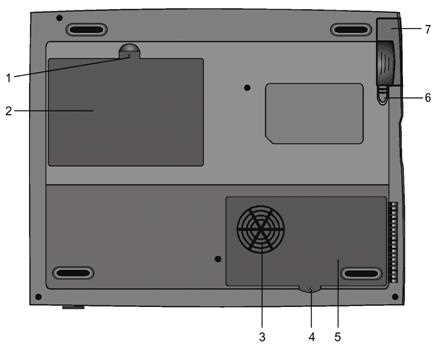
1. Fixing screw
2. Hard drive bay
3. CPU heatsink / fan grill
4. Fixing screw
5. CPU heatsink cover
6. Battery latches
7. Battery pack
Function Keys
FN + F1 - Hibernate
FN + F3 - Battery Low Warning Beep on/off
FN + F4 - Toggle the display between LCD, CRT, LCD+CRT
FN + F5 - Increase volume
FN + F6 - Decrease volume
FN + F7 - Increase brightness
FN + F8 - Decrease brightness
FN + Num Lock - Activate Numeric Keypad
Note - The Fn + F9/F10 contrast control keys don't work on the 5480 as it has a TFT display. These keys are only designed to work on older models using Dual Scan DSTN screens.
In the Box
Disks Supplied
- Advent recovery CD
- Driver utility CD
- InterVideo WinDVD
Items Supplied
- Advent 5480 notebook
- Mains power adapter
- Mains power cable
- UK modem cable
Documentation Supplied
- Advent notebook user's manual
- Gettings started with Microsoft Windows Me
- Update: CPU and SDRAM jumper setting note
- Freeserve leaflet
Recovery
Warning: do not manually format the hard drive on this notebook. This will prevent driver installation during recovery. If the drive has been formatted you will need to contact the Advent notebook helpine to obtain a ghost image recovery CD.
A bootable recovery CD is supplied with with your notebook. Insert this into the DVD drive and restart your computer. The recovery CD boots up into a menu offering the following options :
- Recover Current Windows. Reinstall Windows whilst keeping your personal data and any installed applications. All original Windows installation files will be restored.
- QuickRestore System - No Format. This option will install a new operating system whilst keeping all your data. However, any Windows applications and settings will need to be reinstalled. Your old Windows is backed up!
- QuickRestore System - Quick Format. This option will format the hard disk and install a new operating system. All personal data and applications will be erased.
Use the tab, arrow, enter keys to navigate. The options can be selected using standard radio buttons. When the required option is selected, click Next.
Follow the prompts on the screen to complete the restoration of the software.
FAQ
Replacing the CMOS Battery
The laptop takes a standard CR2025 battery. Access to the battery is from underneath the laptop. First remove the CPU exhaust cover flap, next remove the CPU exhaust itself. This should give you access to a gold coloured flap under which you'll find the battery.