 Acer File Extensions |
Advent 6470 Laptop
Specification
| CPU | Intel Celeron 1.7GHz |
| BIOS | AMI BIOS. Press DEL to enter |
| Memory | 1286MB PC2100 DDR SODIMM (2 memory slots. Max 1GB) |
| Hard Drive | 20GB |
| CD Drive | 8x Matshita SR-8174 DVD ROM |
| Floppy Drive | Floppy disk drive fitted |
| Screen | 14.1" TFT (Native Res.1024x768) |
| Video Card | SiS 650 |
| Sound Card | SiS 7012 |
| Modem | PCTel HSP MR 56K |
| LAN | SiS 900 |
| PC Card | None |
| Ports | 1x Parallel 1x IEEE1394 (FireWire) 1x VGA 2x USB 1x LAN 1x Modem 1x Microphone 1x Headphone 1x IR 1x P/S2 1x Kensington Lock 1x S-Video (TV-Out) |
| Made By | Gericom N34AS1 |
Drivers
Your laptop should have been supplied with a utility CD which contains a backup copy of all the drivers.
Memory Upgrades
Many thanks to John Thomson for the following info.
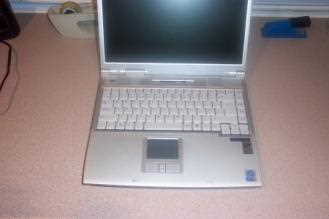
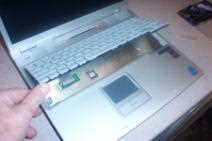
Remove the keyboard by releasing the 3 retractable clips at the front of the keyboard with a small screwdriver (these should be below the 'Fn', the 'Alt Gr', and the 'Down Arrow' keys). When removing the keyboard be careful not to damage the strip cable at the back.
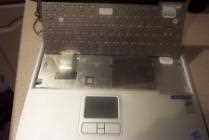
Undo and remove 2 small screws securing memory cover plate (on right hand side). Remove cover plate.
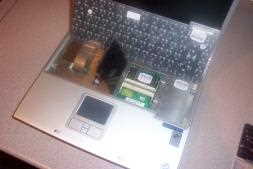
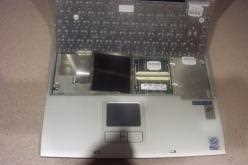
Insert the upgrade into the free slot at a slight angle (The slot in the PCB edge showd the correct way). Make sure it is fully home in the connector before applying downward pressure to secure it into the retaining clips. Refit cover, clip K/B back in.
Reboot M/C, and right click on My Computer, General Tab, and check that M/C has picked up the extra memory
Bottom of Laptop
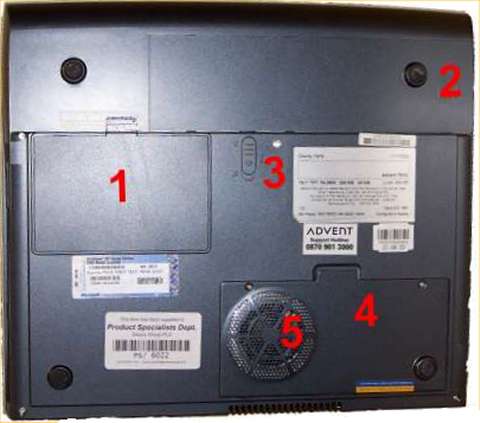
1. Hard disk drive
2. Battery pack
3. Battery pack release
4. CPU access
5. CPU fan
Function Keys
Fn + F1 - Enters Suspend Mode
Fn + F3 - Turns Battery Warning Beep on or off
Fn + F4 - Changes Display Mode: LCD-only, CRT-only and LCD&CRT
Fn + F5 - Turns Speaker Volume up
Fn + F6 - Turns Speaker Volume down
Fn + F7 - Increases Display Brightness
Fn + F8 - Decrease Display Brightness
Fn + Num Lock - Enables the Numeric Keypad
In the Box
Disks Supplied
- Advent 6470 recovery CD x2
- Notebook utility CD
- Electronic manual CD
- Power DVD XP 4.0 CD (Serial number on front of CD sleve)
Items Supplied
- Advent 6470 notebook
- Mains power adapter
- Mains power cable
- UK modem cable
- BT connector
Documentation Supplied
- Microsoft Windows XP Home Edition "Start here" guide
- Freeserve leaflet
Recovery
The recovery process will restore your computer to its "out of the box" state. This will delete all your personal files. Make sure that you save these to disk before you begin. Once the computer has been recovered you will not be able to retreive these files.
To begin system recovery, follow the following steps:
- Insert CD into the DVD drive.
- Restart your computer.
- A recovery page will be displayed warning that everything on the hard drive will be deleted and if you would like to continue, Press Y to continue.
- Press Y to confirm your selection on the next page ensuring the user is aware that all data will be lost from the hard drive.
- Press Y for a third time to start the recovery process (Make sure you have backed up any personal data before agreeing to this question, as all data will be erased).
- The files will now be copied over to the hard drive from the CD.
- When prompted, insert CD 2.
- When the recovery has completed remove the CD and press CTRL, ALT and Delete to reboot the system.
- Once you have restarted the computer, you will need to answer a few simple questions to begin using your computer again, then the recovery process is complete.
Driver CD
The notebook is supplied with a Utility CD. This can be used to restore corrupt drivers.