 Acer File Extensions |
Advent 7055 Laptop
Specification
| CPU | Intel Pentium 4 3.06GHz (Northwood) |
| BIOS | Insyde BIOS. Press F2 to enter |
| Chipset | SIS 650 |
| Memory | 512MB PC2700 DDR SODIMM (2 memory slots. Max 1GB) |
| Hard Drive | 40GB Seagate ST94011A |
| CD Drive | Pioneer DVD-RW DVR-K12D |
| Screen | 15" TFT (Native Res.1024x768) |
| Video Card | SiS 650 (64MB shared) |
| Sound Card | Realtek AC'97 audio |
| Modem | HSP56 MR-8640 |
| Network Card | SiS 900 |
| PC Card | 1x Type I/II |
| Ports | 1x Microphone 1x Headphone 1x Kensington Lock 1x Modem 1x PS2 1x LAN 4x USB 2.0 1x S-Video (TV-Out) 1x VGA 1x Parallel 1x PC Card Slot |
| Touchpad | Synaptics Touchpad |
| Power Supply | FSP 120-AAC |
| Battery | 8640SC (14.8v 4000mAh) |
| Weight | 3.4kg |
| Made By | Medion MID2020 (MD42416) Mitac 8640SC |
Drivers
Your laptop should have a backup copy of all the drivers, you can find it by browsing to the c:\applications\drivers folder.
Memory Upgrades
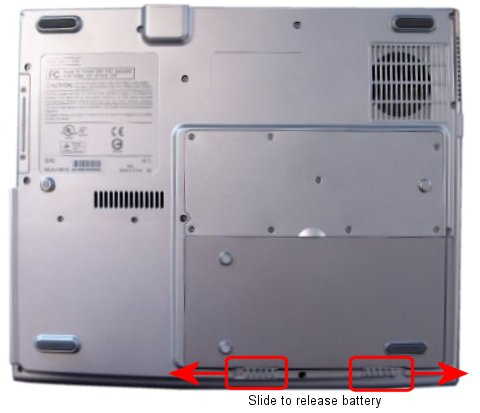
This laptop has two memory slots, one is accessed by removing the memory compartment cover underneath the laptop while the other is hidden under the keyboard and a bit harder to reach. To access the second slot you first need to unclip the panel above the keyboard using a screwdriver with a thin blade. This should reveal 3 screws which once removed will allow you to gently lift out the keyboard (be careful not to damage the cable). The memory slot is under a metal panel in the middle which is held in with 3 screws.
Bottom of Laptop
Function Keys
Fn + F5 - Switches between internal and external displays
Fn + F6 - Decreases brightness
Fn + F7 - Increases brightness
Fn + F10 - Turns the low battery warning on or off
Fn + F11 - Display backlight on/off
Fn + F12 - Power saving (set to power down as default)
The 4 multimedia buttons can be reprogrammed using the EasyButton utility, located in Start > All Programs
In the Box
Disks Supplied
- Advent system recovery CD version 3
- Microsoft Works 2003 DVD (Product key on CD sleeve)
Items Supplied
- Advent 7055 notebook
- Mains power adapter
- Mains power cable
- UK modem cable
- BT phone connector
Documentation Supplied
- Advent user manual
- Advent troubleshooting guide
- Microsoft Windows XP Home Edition "Start here" guide
- PowerDVD XP 5 CD Key card
Recovery Disc
Due to the nature of the recovery process you should not use FDISK or any other partition management software to delete the partition on your Advent computer. Doing so will prevent the recovery from functioning correctly. If the recovery asks for a second CD you will need to obtain an Update CD from Advent.
To recover your Advent PC you will need your Advent System Recovery CD.
- Place the CD into the DVD drive and restart your computer.
- Press R on the keyboard when prompted.
- The recovery will load and display a menu of options:
- Non-destructive recovery: This option will restore Windows, supplied applications, and drivers. This option will not destroy your documents or programs. These will be backed up along with the registry. These are restored at the end of the recovery process.
- System Recovery - No format: This will reinstall Windows, supplied applications and drivers. It will move your files to a folder called "My old disk structure". Any applications (except those supplied) will need to be reinstalled.
- System Recovery - Quick format: This option will erase your hard drive including your personal files. Windows, supplied applications and drivers will be reinstalled.
- Select the Non-destructive recovery option and press Next.
- You will be informed about System Restore in Windows, click Yes.
- The recovery will begin. Once this is complete you should eject the CD and click Restart.
Additional information.
Press the ALT and D keys at the recovery menu to access a command prompt. This will allow access to C: drive. The command prompt will default to E:\i386\system32 where you can run a variety of tools including CHKDSK.EXE.
Reinstalling applications
From version 2.x of the recovery system onwards you can install applications from the c:\applications folder. Drivers can be installed from the c:\applications\drivers folder and utilities from the c:\applications\tools folder. You will still need to install Microsoft Works from the supplied CD.