 Acer File Extensions |
Advent T200 PC
| CPU | Intel Pentium 4 650 Prescott (3.4 Ghz) |
| Memory | 1GB DDR PC3200 RAM (2 memory slots. Max 2GB) |
| Chipset | Intel i915GV |
| Hard Drive | 300GB SATA hard drive |
| CD Drive | Dual layer DVD±RW |
| Monitor | 20.1" Widescreen LCD (1600 x 1200) |
| Video Card | Intel i915GV (up to 128MB shared) |
| Sound Card | Realtek AC'97 audio |
| TV Card | Advent USB analogue TV-Tuner |
| Modem | Agere systems AC'97 modem |
| Network Card | Intel PRO/100 VE Intel Pro 2200 wireless LAN |
| Ports | 1x PS/2 Mouse 1x PS/2 Keyboard 1x Modem 2x IEEE 1394 (FireWire) 5x USB 2.0 (1 port labelled as TV only) 1x LAN 1x Line-in 1x Line-out 1x Microphone 1x SPDIF Digital Output 1x S-Video Out 1x 4-in-1 Card Reader |
| Keyboard | Advent wireless keyboard (8190URF) |
| Mouse | Advent wireless mouse (8190URF) |
Front/Back View
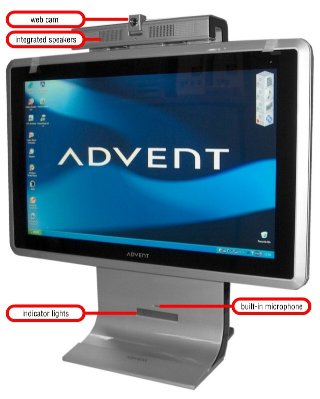 | 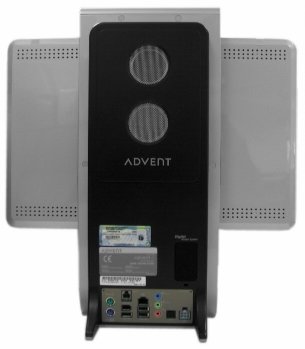 |
In the Box
Disks Supplied
- Microsoft Works 8 CD
Items Supplied
- Advent keyboard and optical mouse
- Advent USB keyboard and mouse RF receiver
- UK mains power cable
- Power supply
- Advent analogue TV-Tuner
- UK modem cable
- TV-Tuner remote
Documentation Supplied
- Advent SP2 users manual
- Advent recovery instructions sheet
- Microsoft Windows XP 'Start Here' guide
- Advent setup topsheet
Recovery Disc
To begin the recovery process, turn on the PC and insert the Recovery DVD into the DVD ROM drive. After a few seconds a menu will appear with the following 2 options -
- Restore Windows XP
- Boot to DOS prompt from CD-ROM
Choosing option 1 will start the recovery process.
Two warnings will appear, informing you that running the recovery process will delete all files from the hard drive. To continue past the first warning, press any key. The next warning requires you to press Y to continue with the recovery or N to halt the recovery process. After pressing Y a recovery screen will be shown which informs you of the progress of the recovery.
The recovery will continue to 100%, at which point you will be prompted to remove the disk and restart the PC. Once restarted the PC will continue to boot into the Windows operating system.
FAQ
Who Made This PC?
As far as I can tell the T200 was made in Korea by a company called TriGem and is based on their "LLUON" series PC.
Replacement AC Adapter
One of the most asked questions we get about the T200 is how to get hold of replacement power supplies. The model supplied with the Advent T200 was underpowered and suffers a fairly high failure rate. Brian Milnes sent this in which explains the problem better than I can -
These Advent T1 & T100 PCs are great machines let down by a woefully inadequate PSU. The original HP-AU180D43 is under powered at 160-180W peak. In my experience a 200W+ PSU is required for this PC.
To be concise, you have two primary options:
- Buy a replacement 220W Delta Electronics SADP-220DB B PSU. These are occasionally available on eBay, where I bought two for £92 incl. carriage. They are fine and resolve the Power problems.
- Buy a Dell DA-2 D220-01. These are essentially the same unit, except they have an 8 pin plug. The pin assignments are different, but the two additional are Dell specific (reserved for remote) and the other six are 3 power, 3 ground lines. you can either cut off your plug and splice it into the new one, or open up the brick (with a small Torx screwdriver) and de-solder re-solder the power lines for an elegant solution.