 Acer File Extensions |
Canon BJC-5000 Printer
General
Alternative Drivers
Can only print in windows, no DOS support
Cartridges
- BC-23 - Black Ink
- BCI-21bk - Black Ink Tank (BC-21)
- BCI-21c - Tri Colour Ink (BC-21)
- BC-21e - Colour Print Head
- BC-22e - Photo Ink
- BC-29f - Fluorescent Ink
Cleaning Print Head
With the printer switched on press and hold the Resume button until you hear one beep.
Self Test
Switch Printer off. Hold the Power button until you hear one beep.
Serial Number
Located rear right side corner of printer near power cord
Known Issues
Black Page When Printing Faxes
If when you print a fax, it comes out as a solid black page, go into the printer's properties and set the printer to Mono.
Printing Squashed or Running off Right Hard Side of Page
If your printing is either squashed down the left hand side of the page, or that it runs off the right hand edge of the page the cause is down to the printer not detecting the right colour cartridge in the printer.
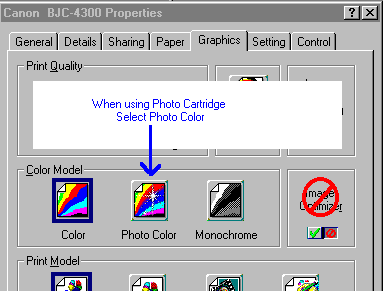
What you need to do is go into the Properties for the printer, then into the Graphics tab, and in the Colour Model section, change the setting from Colour to Photo Colour (if it is already set to Photo Colour, change it to Colour).
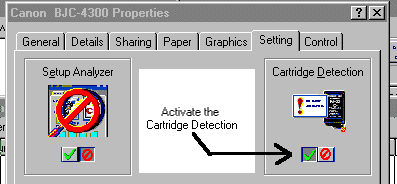
It might also be worth turning on Cartridge Detection as well.
Only Prints Black Text/Graphics When Monochrome Selected
When printing a document with Colour selected in the printer driver and a BC-21e cartridge installed in Holder 1 and BC-23 installed in the HOLDER 2, it will not print any black text/graphics. But when the printer driver is set to monochrome it prints the black text/graphics perfectly.
The BCI-21 Black ink tank is empty. This is because when printing in colour, the BC21e printhead is used for all printing, including black. But when printing in monochrome the BC-23 is used.
Severe: PnP Hardware ID not found in canon.ini - Installation aborted!
When you trying to print to a Canon BJC-5000, you may receive the above error message. This means that the printer driver has not been installed properly. The solution is to reinstall the printer driver.
Error Codes
| Error | Indicator | Beeps | Solution |
|---|---|---|---|
| Paper Feed / Delivery | Lights in orange | 2 | Remove any paper jammed |
| BJ Cartridge (Holder 1) not detected | Lights in orange | 3 | Re-install cartridge or replace it |
| BJ Cartridge (Holder 2) not detected | Lights in orange | 4 | Re-install cartridge or replace it |
| BJ Cartridge High heat error | Lights in orange | 5 | Let cartridges cool, and retry, if not replace the faulty BJ cartridge |
| Waste Full Warning | Lights in orange | 6 | Waste is almost full, needs service very soon |
| Home position error | Alternately blinks in green once and orange twice | 7 | home position of the carriage cannot be detected |
| Cleaning error | Alternately blinks in green once and orange 3 times | 7 | head cleaning or capping detection at the capping position is irregular |
| Sheet feeder error | Alternately blinks in green once and orange 4 times | 7 | initial position of the pick-up roller cannot be detected |
| Temperature sensor error | Alternately blinks in green once and orange 5 times | 7 | reading of the temperature sensor (TH1) on the logic board is irregular |
| Waste ink full error | Alternately blinks in green once and orange 6 times | 7 | total waste ink amount recorded by the EEPROM has exceeded the specified limit |
| Head temperature error | Alternately blinks in green once and orange 7 times | 7 | temperature in the BJ cartridge has exceeded the specified limit |
| Sub-heater error | Alternately blinks in green once and orange 8 times | 7 | sub-heater in the BJ cartridge is not operating properly |
| BJ cartridge not found error | Alternately blinks in green once and orange 9 times | 7 | printer cannot detect the BJ cartridge. Only the BJ cartridge replacement operation is detected |
| EEPROM error | Alternately blinks in green once and orange 10 times | 7 | EEPROM check has recognized some kind of irregularity |
| ROM error | Alternately blinks in green once and orange 11 times | 7 | ROM check fails when the AC power cord is plugged in |
| RAM error | Alternately blinks in green once and orange 12 times | 7 | RAM check fails when the AC power cord is plugged in |
Notes
In the case of BJ Cartridge Not Found or Overheated/Failed Printhead errors, you need to determine which cartridge/printhead is at fault. To do this,
- Power on printer
- Open Printer Cover
- The Cartridges should center
- Unplug Printer
- Remove the printhead from Holder 2.
- Close Printer cover
- Replug printer in
- Swap Printheads into Holder 1 until you have determine with Printhead is causing the error.
- Replace the failed printhead (BJ Cartridge).