 Acer File Extensions |
Packard Bell Bora Pro M/Board
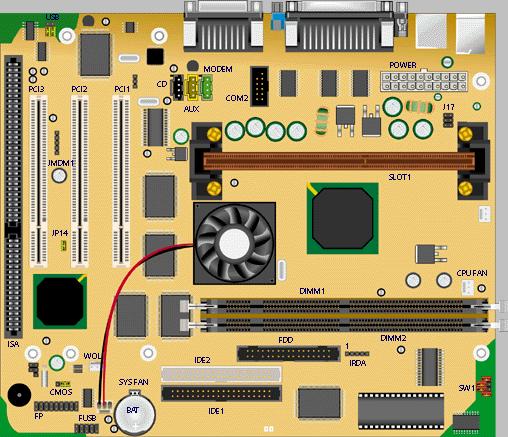
Specification
- Audio : Creative 1373.
- BIOS : AMI BIOS.
- Cache : Integrated in CPU.
- Chipset : Intel 82440ZX PCI set (82443ZX PCI/AGP controller (PAC) and 82371EB PCI/ISA IDE Xcelerator (PIIX4)).
- CPU Support : Slot 1: Intel Pentium II, Pentium III or Celeron.
- Expansion Slots : 2 PCI slots and 1 shared ISA/PCI slot.
- Form Factor : MicroATX
- RAM : 2 DIMM sockets supporting single- or double-sided SDRAM up to a maximum of 256 MB.
- Video : 3DFX Voodoo 3, 8 MB SGRAM.
Upgrade Options
- CPU : CPU upgradeable to Intel Pentium II 333/66 MHz or 600/100 MHz, Pentium III up to 500 MHz, Celeron up to 466 MHz.
- RAM : Upgradable up to 512 MB using 66 or 100 MHz SDRAM DIMMs. The Bora Pro motherboard only accepts 168-pin DIMM modules. Only gold-plated DIMMs may be used, as the sockets on the motherboard are also gold-plated, and oxidation must be prevented. Use 3.3 V CAS Latency 2 or 3, single- or double-sided DIMMs only. Parity is not supported.
Jumpers
| Jumper | Configuration |
|---|---|
| BAT1 - Clear CMOS | 1-2 : Normal operation (default) 2-3 : Clear CMOS settings (keep system unplugged for five seconds) |
| JP14 - Clear BIOS Password | ON : Keep password (default) OFF : Password is cleared |
| JUSB - Front USB | 1-4, 2-5 : Front USB enabled (upper back USB 'C' disabled) 2-5, 3-6 : Upper Back USB 'C' enabled (front USB disabled) |
SW1 - Four 2-pin jumpers to set multiplier:
| Multiplier | 1 | 2 | 3 | 4 |
|---|---|---|---|---|
| x3.5 | ON | OFF | OFF | ON |
| x4 | ON | OFF | ON | OFF |
| x4.5 | ON | ON | OFF | OFF |
| x5 | ON | ON | OFF | OFF |
| x5.5 | ON | OFF | OFF | OFF |
| x6 | OFF | ON | ON | ON |
| x6.5 | OFF | OFF | ON | ON |