 Acer File Extensions |
Advent 6414 Laptop
Specification
| CPU | Intel Pentium III 1.10GHz |
| BIOS | AMIBIOS. Press DEL to enter |
| Chipset | SIS 630 |
| Memory | 256MB PC100/133 SODIMM (2 memory slots. Max 512MB) |
| Hard Drive | 30GB |
| CD Drive | 8x Toshiba SD-C2502 DVD-ROM |
| Floppy Drive | Floppy disk drive fitted |
| Screen | 14.1" TFT (Native Res.1024x768) |
| Video Card | SiS 630 (up to 32MB shared) |
| Sound Card | SiS 7018 |
| Modem | SmartLink 56K - HAMR 5600 V.90 |
| Network Card | SiS 900 |
| PC Card | Will take either 2x Type I/II or 1x Type III |
| Ports | 1x IR 1x Kensington Lock 1x USB 1.1 1x Modem 1x PS/2 1x Microphone 1x Headphone 1x VGA 1x Serial 1x Parallel 1x LAN |
| Battery | UN340S1 (14.8v 3600mAh) |
| Dimensions | 39.5 x 315 x 256 (HxWxD in mm) |
| Weight | 3kg |
| Made By | Gericom Webgine N340S8 |
Drivers
Your laptop should have been supplied with a utility CD which contains a backup copy of all the drivers.
Memory Upgrades
- Remove the keyboard by releasing the 3 retractable clips at the front of the keyboard with a small screwdriver (clips are below the 'Fn', 'Alt Gr', and 'Down Arrow' keys).
- Lift the keyboard clear of the notebook, there is a ribbon cable attached to the keyboard so take care.
- Now lift the metal keyboard protector from the case.
- Next remove the metal cover in the middle of the case (held in by two screws).
- You now have access to the 2 memory slots.
Bottom of Laptop
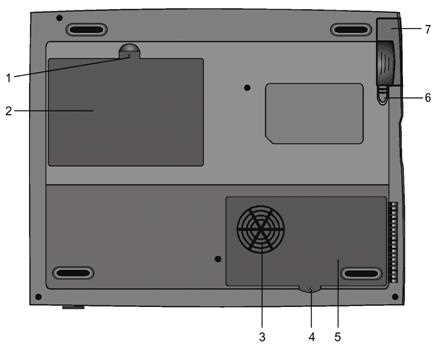
1. Fixing screw
2. Hard drive bay
3. CPU heatsink / fan grill
4. Fixing screw
5. CPU heatsink cover
6. Battery latches
7. Battery pack
Function Keys
FN + F1 - Hibernate
FN + F3 - Battery Low Warning Beep on/off
FN + F4 - Toggle the display between LCD, CRT, LCD+CRT
FN + F5 - Increase volume
FN + F6 - Decrease volume
FN + F7 - Increase brightness
FN + F8 - Decrease brightness
FN + Num Lock - Activate Numeric Keypad
Note - The Fn + F9/F10 contrast control keys don't work on the 6414 as it has a TFT display. These keys are only designed to work on older models using Dual Scan DSTN screens.
In the Box
Disks Supplied
- Advent recovery CD
- Driver and utility v.0.9 CD
Items Supplied
- Advent 6414 notebook
- Mains power adapter
- Mains power cable
- UK modem cable
Documentation Supplied
- Advent notebook user's manual
- Gettings started with Microsoft Windows Me
- Freeserve leaflet
Recovery
Warning: this process will erase all files from your computer. It is important that you save any personal files to disk before you begin.
A bootable recovery CD is supplied with these machines. To recover the system:-
- Insert CD (and floppy disk if supplied) into the drive.
- Reboot the PC.
- A warning message prompting you to backup data before proceeding.
- Press Y to continue.
- A final warning that all data will be erased is displayed.
- Press Y to continue.
- Finally a message "Remove CD-ROM when prompted" is displayed.
- Press Y to continue.
- The image file will load. Once complete you will be prompted to remove the CD and press CTRL + ALT + DEL to restart.
Driver CD
The notebook is supplied with a Utility CD. This can be used to restore corrupt drivers.
FAQ
Blank screen or EMM386 error after recovery
Once the recovery has completed the screen goes blank or an EMM386 error message is dispalayed. This happens because the laptop is having problems displaying the message to remove the CD and restart. Simply remove the CD from the drive and restart the laptop, first time setup will begin as normal.
Replacing the CMOS Battery
To get to the CMOS battery you need to remove the CPU heatsink cover underneath the laptop. The battery is a coin sized CR2025. If you have problems reaching the battery then you'll need to take out the CPU heatsink, to do this remove the 4 screws holding it in and lift out carefully.
Repairing a Broken Charger Socket
Kyle Millican has put together a guide for repairing a broken charger socket on this laptop. The guide is in PDF format and can be downloaded from here - Kyle Millican’s - Advent Laptop Charger Socket Repair Guide (2MB)